So. It’s been a minute.
Yes, this is a new BuffsBlog post — the first in longer than I’d care to admit. There’s a story behind the quiet around here, and I’ll tell it properly in a future post. (A small piece of it is actually hiding near the bottom of this article, if you’re the impatient type.)
But fall camp is nearly here, the opener is seven-ish weeks out, and there’s a more urgent question to answer first:
Where are the games?
I don’t mean that existentially.
When you sit down on a Saturday this fall, which app, channel, or service will your game be on? Because in 2026 the honest answer is “it depends,” and figuring out how to watch college football has quietly become harder than playing it. So consider this your guide to how to watch college football in 2026 where we tackle every realistic option, what each one actually costs, and what I’d do with my own money.
For the record, and yes there’s always a record — I checked every price in this article this week, because they change seemingly weekly. Never downward BTW.
Why this got so stupid
Blame realignment. Blame the Streaming Industrial Complex™. Regardless, here’s the practical reality for CU fans: the Buffs play in the Big 12, and the Big 12 sold its games to ESPN, FOX, and TNT. Three different companies. Three different apps. Over the course of one season CU fans might watch games on ABC, then FS1, then HBO Max. And I’m not making this up — the app HBO Max was formerly known as HBO, and then formerly known as Max, and then the marketing geniuses said screw it and now it’s <drum roll> HBO Max.
Who hired these people?
It’s maddening. And it’s not just us — every conference is scattered. So let’s untangle the whole board.
ESPN finally cut the cord on itself
The biggest change: there is now a standalone ESPN app you can buy without cable, and for college football it’s the single most important option, because ESPN still carries more games than anybody.
There are two tiers, and the difference matters:
- ESPN Unlimited — $29.99/month, or $299.99 for the year. The big one. Every ESPN network — ABC, ESPN, ESPN2, ESPNU, ESPNews, ESPN+, plus the SEC Network and ACC Network — all streaming in one app. If your team lives in ESPN’s world (the SEC and ACC essentially do, and many CU games land here too), this is home base. Thirty bucks stings until you remember it’s replicating an entire cable sports tier with no contract and no cable box.
- ESPN Select — $12.99/month. This is the old ESPN+ in a new coat, and it’s a trap for the unwary. You get the ESPN+ exclusives — and there are a lot of college games that live only there, including Big 12 and Group of Five matchups — but you do not get actual ESPN, ESPN2, or ABC. It a s decent add-on but a fustrating standalone. Caveat emptor.
If you take one thing from this section: for most fans, Unlimited is the closest thing to “the one app with the most football.”
FOX One: the other half of the puzzle
ESPN doesn’t have it all. A big chunk of the best Saturday windows — the noon Big Ten kickoff, plenty of Big 12 games — live on FOX, FS1, and the Big Ten Network, and none of those are in ESPN’s app.
That’s where FOX One comes in, at $19.99/month: FOX, FS1, FS2, and BTN in one place. If your team plays in the Big Ten, or you simply refuse to miss Big Noon, this is the companion piece.
The $40 bundle that solves most of it
Here’s the move a lot of cord-cutters are landing on, and honestly, it’s the cleanest answer right now: ESPN and FOX teamed up on a bundle for $39.99/month that combines ESPN Unlimited and FOX One.
Think about what that covers. ABC, ESPN, ESPN2, ESPNU, FOX, FS1, BTN, the SEC and ACC Networks, and every ESPN+ exclusive. That’s most of a Saturday, for less than half of what a live-TV bundle runs, with no contract. For the fan who wants football and does not care about local news or HGTV, this is the one.
What it doesn’t cover: the strays on CBS, NBC/Peacock, TNT/HBO Max, and The CW. We’ll get to those, because one of them matters a great deal to Buffs fans.
The full bundles, for the “just give me everything” crowd
If you want sports and the rest of television (locals, news, the channels your spouse actually watches), a live-TV streaming bundle is still the most complete (and priciest) path. The field, cheapest to most expensive:
- Sling TV ($45.99–$65.99/month). The budget pick, with the budget catch. Orange has the ESPN channels; Blue has FS1 and BTN; the combo gets you both. But Sling is thin everywhere else, and don’t count on all your locals or the SEC/ACC Networks. Fine for a specific fan, incomplete for a die-hard.
- Fubo (roughly $85–90/month, plus regional sports fees). Built for sports fans, and the lineup shows it as it provides ESPN, FOX, conference networks, locals. It also raised prices this year (I’d say “shocking” again but we’re past that), so confirm the number when you sign up. For Colorado peeps, Fubo has Altitude, so that’s a definite plus in its corner when NBA and NHL season is upon us.
- YouTube TV ($82.99/month). My longtime pick, and still what I’d hand a non-tech-savvy friend. It has essentially everything (ESPN family, FOX/FS1, BTN, SEC and ACC Networks, CBS, NBC, ABC locals) plus unlimited DVR and a legitimately great multiview for stacking four games at once on a Saturday. Not cheap. Very “set it and forget it.” One con for Colorado peeps: no Alttitude TV.
- Hulu + Live TV (about $90/month). Comparable to YouTube TV, and it bundles Disney+ and the ESPN app, which is a real perk. Just verify your conference’s network is in the tier you pick as that’s the fine print that bites people.
- DirecTV Stream ($90–105/month for the sports tier). The most expensive and the most “this is just cable again.” Its sports tier carries the conference networks and regional sports nets, including Altittude TV. Most fans don’t need to spend this much.
The stragglers you’ll still need
No matter which road you take above, a few games every week stubbornly live somewhere else. Don’t get caught out:
- NBC / Peacock ($10.99/month, $16.99 ad-free). NBC has an exclusive Big Ten game most weeks, and Peacock has games you genuinely cannot watch anywhere else (plus Notre Dame home games). For Big Ten fans, this is basically mandatory. Quick note, however — YouTube TV now has NBC Sports Network which is showing many of the games that used to live solely on Peacock. Do with that information what you will.
- CBS / Paramount+ ($13.99/month for the tier with your live CBS feed). CBS has a weekly Big Ten window now. If you don’t get CBS over the air, this is the workaround.
- TNT / HBO Max ($10.99/month with ads, $18.49 without). The one everybody misses and the one CU fans can’t. TNT Sports carries a slate of Big 12 games, streaming on Max. Yes, that means some Buffs games live in the same app as The White Lotus. Budget for it.
- The CW (free!). The CW airs a handful of ACC, Pac-12, and Mountain West games, over the air and on its free app. Note for our purposes: no Big 12 games, so no CU here, but free football is free football.
- A $30 antenna. The analyst in me insists: ABC, CBS, FOX, and NBC carry the biggest games every single week, in HD, for free, forever. An antenna plus one cheap streaming app is the quiet value play of this entire article.
What I’d actually do
Okay. You’ve seen the board. Here’s how I’d play it, depending on the kind of fan you are:
- The die-hard who wants every game: the ESPN + FOX One bundle ($40) + Peacock ($11) + an antenna. That’s roughly $51/month for nearly everything and you should add Max (~$11) because you follow a Big 12 team, and you’re still around $62, well under a cable bill.
- The “one app, no thinking” type: YouTube TV at $83 (or Hulu Live at ~$90) and call it a day. Everything’s there. Great DVR. Done.
- The casual: an antenna for the big network games plus ESPN Select ($13) for the streaming exclusives. Under $15/month and you’ll catch what matters.
The part nobody tells you (and where I’ve been)
Here’s the dirty secret of 2026: finding how to watch games is the hard part.
You can subscribe to all the right services and still sit down on a Saturday with no idea whether the Buffs are on ABC at noon, FS1 at 1:30, or buried on HBO Max at night. Kickoff times get announced on six days’ notice. The schedule shifts week to week. And the apps have no interest in helping you — each one pretends the others don’t exist.
I got tired enough of this exact problem I went and did something about it. That’s a big piece of where I’ve been these past months, readers: I built an app.
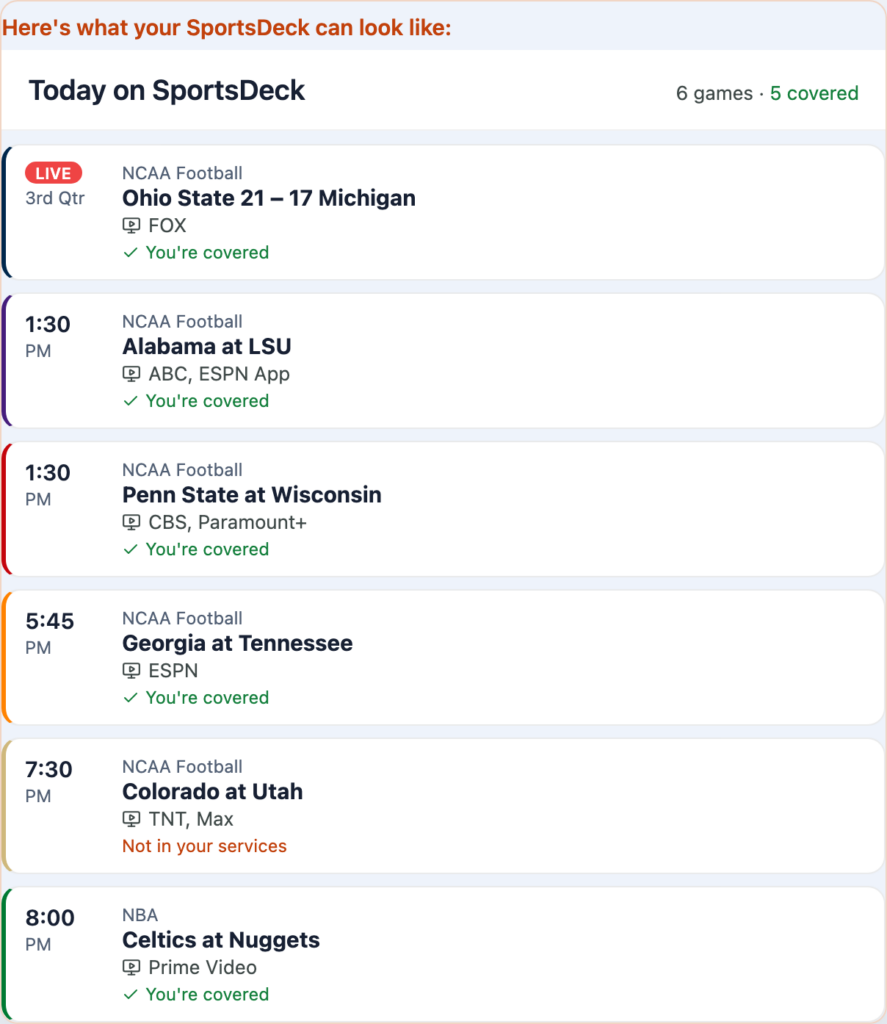
It’s called SportsDeck, and it does the thing this whole article is about. You pick your teams — the Buffs, obviously, plus whoever else you follow in any sport — and it simply shows you what’s on today, what time it starts in your time zone, and exactly where to watch it, based on the services you actually have. It flags the other big games worth your Saturday, and every morning it emails you the day’s slate so you’re set before your coffee’s done. No box scores to dig through, no six-app scavenger hunt. It also gives you news, podcasts, and YouTube channels devoted solely to your team. It also gives you recommendations on TC coverage to save you money.
Think of it as the 21st century version of the sports section of your favorite local newspaper, designed to help you follow your teams.
It’s free, it works on the web and iPhone, and it’s at mysportsdeck.com. It will soon hit the Appe App Store. The full story of how a semi-retired attorney with no business writing software ended up shipping an app — that’s the future post I owe you. It’s a good one. It’ll be here soon.
One last thing
Circle the calendar now: the Buffs open Thursday, September 3, at Georgia Tech, on ESPN. A weeknight road opener under the lights, because apparently we ease into nothing around here.
It’s good to be back.
More from BuffsBlog
- How to Watch College Football in Fall 2025: Best Streaming Options for Fans
- I’VE VISITED 23 COLLEGE FOOTBALL STADIUMS — HERE’S WHY FOLSOM FIELD IS THE BEST (SO FAR): BUFFBLOG MAILBAG REVISITED
- BEST COLLEGE FOOTBALL WEBSITES AND YOUTUBE CHANNELS YOU SHOULD BE FOLLOWING IN 2025: BUFFSBLOG MAILBAG REVISITED
Holy shit John is back!
It’s so good to see BuffsBlog back up. I’ve loved the site and have been bummed we haven’t heard your take on all things CU over the last few months — glad to hear you’re back. This is the best CU site out there.
Go Buffs!
Thanks for the kind words, Dave. I’ve been working on some stuff, some of which I’ll be talking about more in the not-too-distant future.
Thanks for reading!
I’ve missed BuffsBlog!
Things at CU have been shakey, and we need your perspective. Glad to hear you’re doing well and cooking up some cool things. I’ll definitely check out the website/app!
Thanks Irvin. JR Payne has the women’s hoops team cooking, Danny Sanchez has the women’s soccer team dancing, and Tad Boyle has the men’s hoops team……
Here we go: I’m worried about the football team — I think Vegas is about right with the over and under at 4.5 wins. That half win might be tricky though.
Sometimes it’s best not to say anything at all.
I want MOAR CU from Buffsblog!
Glad to have you back!
It is great to see some new activity in the Blog! We have missed you. It has been a painfully slow offseason with no CU Buffs news. Good luck with the app.
Thanks Brett. Appreciate it.
Pingback: In This House We Believe in the Buffs and the Broncos